Your music follows the round.
Tired of getting fragged mid-song? VibePause pauses your music the second a VALORANT round starts, then brings it back when you die, buy, or head back to the lobby. It runs quietly in your tray.
Free, no account, no admin rights. Available in 15 languages (machine-translated, so some wording may be off). The installer is not code-signed yet, so Windows may show a SmartScreen warning. Choose More info, then Run anyway.
No overlayNo game injectionNo memory reading Why it's safe to run →
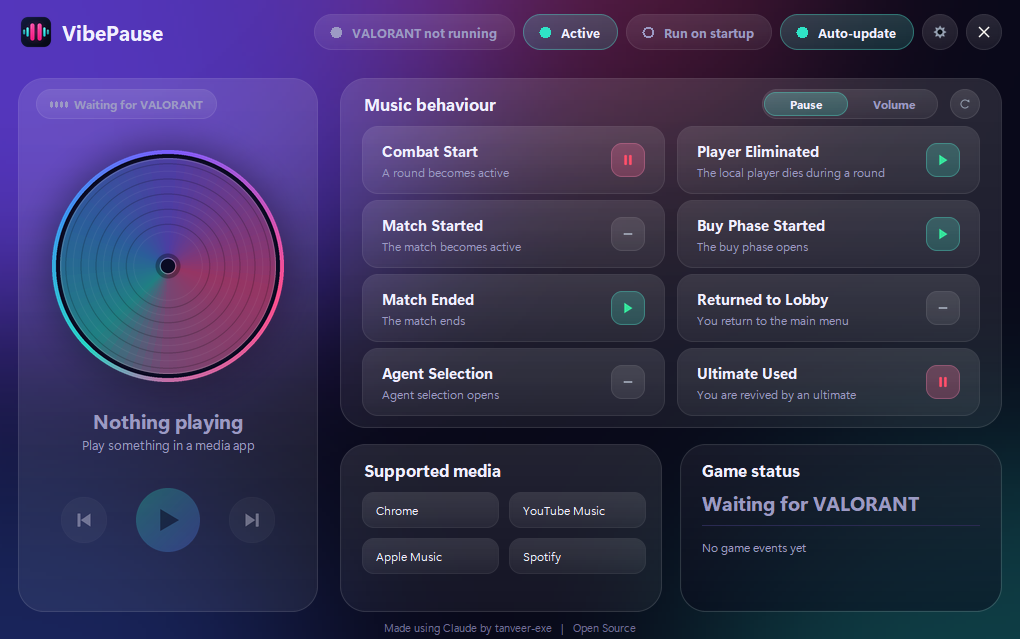
Pick an event, see what happens.
This is an example setup. In the app you can set every event to Play, Pause, or None, or switch to Volume mode and give each event its own volume.
Pause mode
The default. Each event plays your music, pauses it, or does nothing. Use it when you want the music to stop completely during a round.
Volume mode
Each event sets a volume from 0% (silent) to 100% with a slider instead. Click the percentage to leave an event unchanged. The music keeps playing and only gets quieter or louder, so you can keep it low in the background during a round.
Volume mode changes the same per-app volume you see in the Windows volume mixer. It never touches VALORANT, Riot software, voice chat or call apps, and it puts volumes back when you switch to Pause mode or close VibePause.
How it works
No overlay, no hooks into the game. VibePause reads VALORANT's log file, uses Windows' built-in OCR to spot eliminations, and controls your media through Windows.
It reads the game log
VALORANT writes ShooterGame.log on your own PC. VibePause follows that file to spot round starts and match changes, and uses Windows' built-in OCR to detect when you're eliminated.
It matches the event
Each event has the action you chose: Play, Pause, or None, or a volume level in Volume mode. A delay setting lets you shift when it fires.
It controls your media
It uses Windows media controls, so it should work with players that support them, such as Spotify, YouTube Music, Apple Music and browser players. Compatibility is not guaranteed. Call apps like Discord are left alone.
Installing with Windows SmartScreen
VibePause is a new project and the installer is not code-signed yet. We plan to apply for free code signing from the SignPath Foundation once the project has built up a track record, so Windows may show a warning for now. Only continue if you downloaded the installer from this page or the official Releases page.
Run the installer
Open VibePause_Setup.exe. If your browser says it isn't commonly downloaded, open the download's menu (…), choose Keep, then Keep anyway. The wording differs between browsers.
Click More info
If Windows shows "Windows protected your PC", click More info. The publisher appears as Unknown because the installer is not signed yet.
Click Run anyway
The installer then opens. It installs for your user account, so no administrator rights are needed.
Want to check the file first? In PowerShell, run Get-FileHash .\VibePause_Setup.exe and compare it with the VibePause_Setup.exe.sha256 file on the release page.
It stays out of your game.
VibePause is a separate app that talks to Windows, not to VALORANT. Nothing here touches the game itself.
- No injecting into VALORANT
- No reading game memory
- No changing game files
- No gameplay input
- No in-game overlay
- No Riot account details
Riot Games can change its rules at any time, and VibePause is used at your own risk. See the Terms.
Frequently asked questions
How do I automatically pause my music when a VALORANT round starts?
Install VibePause, start your music app, and launch VALORANT. It pauses your music at round start and resumes it when you die, buy, or return to the lobby. You can change what each event does in the app.
Can I get banned for using VibePause?
VibePause is a separate app. It doesn't inject into VALORANT, read game memory, change game files, send gameplay input, or draw an overlay. It reads a local log file, uses Windows' built-in OCR to spot eliminations, and controls Windows media playback. Riot Games can change its rules at any time, so use it at your own risk.
Which music apps does it work with?
It works with players that support Windows' standard media controls, such as Spotify, YouTube Music, Apple Music and browser players. Compatibility isn't guaranteed for every app.
Is VibePause free?
Yes. It's free, open source under the GPL-3.0 license, and needs no account or administrator rights.
Why does Windows show a SmartScreen warning?
The installer isn't code-signed yet. Click More info, then Run anyway, and only if you downloaded it from this site or the official Releases page. You can also check the SHA-256 file on the release.
Can it lower the volume instead of pausing?
Yes. Switch to Volume mode and give each event its own volume from 0% to 100%.
Open source, GPL-3.0 licensed.
Read the code, build it yourself, or send a fix.